
Using AI to Preserve Films, Not Rewrite Them

Physical media matters
Most film fans I know feel their blood pressure jump when they hear the terms AI and movies in the same conversation. Stick with me a minute; this isn't about using AI to edit or change our cherished films, it's about how I've used it to improve managing my library. The idea is more time watching movies, less time at a computer backing them up.
If you know me or have read anything else here, you know I'm a film fan who leans hard into physical media. I believe if you love a film you should own it, and I mean actually own it — a disc, in a case, on a shelf, that works whether or not anyone's servers are up and whether or not a licensing deal expires. It also means making sure you own the version of the film you know and love, and not something updated for modern audiences under a misguided application of presentism.
Part of the physical media argument is quality. Short of a good cinema, a 4K disc is the best a film is going to look. Not "4K" as a marketing tier on a streaming app, where the bitrate is whatever survives being sent down the pipe to a few million people. Audio that isn't smashed all to hell and a bitrate that does its best to make the film appear the way it did in theaters (grain and all).
The difference isn't subtle when you put them side by side. Most of my friends had no idea what they had given up in quality to gain in streaming convenience until I showed them.
Another key point where physical media earns its keep is in the concept of ownership. Streaming and even digital purchases aren't ownership. No really, it's not check those terms and conditions. It boils down to a long term rental that you have no real ownership rights to. Check recent headlines for examples of movies disappearing out of users' digital collections when services shuttered or licenses expired. Immutability also matters. (I promise I'm not turning this into a security or DR plan). Owning the disc means the version you grew up with and love is the version you always have available. It can't change or be edited on the fly going against the preservation aspect so many collectors value. Even subtle changes erase the history. Films get "remastered" in ways nobody asked for, grain scrubbed away with noise reduction until the actors have waxwork faces and a film shot in 1975 looks like it was shot on a phone last spring. The disc on my shelf has one job and no opinions on any of it.
So: discs. Which brings its own problem.
What backing up a collection actually involves
While I always prefer to watch the discs, I'm a collector with a large library. I'm also an IT guy who worries about things like back ups. I also appreciate the accessibility of what streaming a movie can mean. I.e. I can watch a movie from my collection while on vacation. I just don't want the compromise or lack of ownership going full digital streaming means.
To solve the problem I have developed a fairly long, complex process using separate tools. Each is the best at what they do but there's nothing to orchestrate the entire process except me and a bunch of steps developed over many hours of trial and error.
- MakeMKV to pull a 1:1 copy off the disc
- Subtitle Edit to decode the subtitle tracks and work out which ones need to come along
- HandBrake to encode that into a more sensible size, because a raw 4K rip is 60–90 GB and a shelf's worth of those gets unmanageable fast
- Filebot to keep file names consistent and tag them in a way Plex recognizes
- Plex to actually watch it, at home or on my phone
- A catalog database so I know what I own without standing in front of the shelf
Each software in the chain does a specific job and each required me and my logical intervention before moving along the process:
Picking the right thing to rip.
It's not as easy as doing a right click copy and paste. Discs are complicated file structures that at a glance don't always make sense. A single disc often has multiple branching versions. (Director's, Theatrical, etc.) You also get extras, trailers and behind the scenes stuff. Multiple audio tracks, and those subtitles.
Subtitles.
I was well into backing up my collection before I realized the pitfalls related to subtitles. Plenty of English-language films have subtitles you want: the alien language in a sci-fi film, the untranslated conversation in a spy flick, the sign that matters to the plot. They're not always handled the same way so I would use tools like subtitle edit to open them up and verify them manually. Getting halfway into watching one of your movie backups and realizing you're missing them is not a fun time.
Audio. Same basic problem. Pick the wrong track and you've replaced a lossless 7.1 mix with a stereo or you've grabbed the commentary track by mistake.
Naming. Plex is fussy, correctly. Every file needs the right name, year, and identifier, or you get the wrong film's artwork and a mess to sort through later. This becomes a big deal when your collection gets large. Keeping file names identifiable also means if you ever lose your plex db you're not rebuilding the index for weeks by hand.
Filing it. Moving it to the server, making sure it hasn't landed next to an older copy of the same film, and then remembering to add the disc to the db catalog to keep track of it. Staying organized gets real important when your collection grows into the hundreds and absolutely critical when 1000+.
Call it ten or fifteen minutes of hands-on attention per disc. None of it's difficult once you learn the process but that time adds up. And the process becomes a point of friction between the time you buy the disk and get it on the shelf where it belongs ready to watch. Often times that friction led to a queue waiting to be processed that became depressing to me in its size and scope.
The other issue with manual processes is they start to drift and can get inconsistent. I knew I had data issues but I was dreading fixing them all manually. When I finally audited the library, across 2,384 files: 943 had no edition information, 369 weren't linked to a database entry, 49 were labelled 4K but weren't, the same boutique label (Arrow, Criterion etc) appeared spelled three different ways, and 87 folders held two copies of the same film sitting on 453 GB of redundancy. (I regularly upgrade titles to 4K when my favorites get new versions.) This is what happens when one person does that manual multistep process by hand for years.
There's got to be a better way
I spent time researching better ways to do my processing. There are projects out there built for exactly this (Automatic Ripping Machine and others) and they're good at what they do. Put a disc in, walk away, come back to a finished file.
I passed on all of them for three reasons, and they come down to the same thing: I didn't want somebody's platform, I wanted my process.
I already had a process. Years of trial and error had taught me what I wanted done and in what order, and adopting a finished system means adopting its author's opinions about every step of it. Most of those opinions are reasonable. They just aren't mine.
My preferences are also specific, and they change depending on the film. Foreign language titles are the clearest case. Which audio track and which subtitles come along is a deliberate decision every time, and it's frequently not the one a tool would make on its own. Getting that wrong isn't a crash or an error. It's a film that's subtly not the film I meant to keep.
The last reason is the one I think matters most over time. I didn't want to be locked into anyone else's platform. MakeMKV, HandBrake, Filebot, Subtitle Edit. Each of those is the best at its particular job today. In three years one of them might not be. If what I've built is a wrapper that orchestrates tools, I swap the tool and update the wrapper. If what I've built is somebody else's platform, I'm waiting on them to agree with me.
Earlier this year I wrote up an experiment where we used AI to help make auditing our book shelves more manageable. Similar problem, and the shape of the answer turned out to be the same one: let the machine do the repetitive part, keep a human on every judgement call, and check the output rather than trusting it. That experience got me thinking maybe there was a way to make my movie system better.
So the question was whether I could take a very particular set of personalized steps and automate or speed them up. How could I take what I had learned over the years of curating this collection and apply it to a more automated consistent approach.
First, how big should a film be?
Before I went too far down the automation rabbit hole, I needed to resolve a couple of key questions I had been working on. Some recent HandBrake encodes resulted in far larger than expected final encode sizes. I wanted to get that figured out and settle on a standard for my encodes before going further. Key question how big should a film actually be? How do I make it look great but not break the bank in storage costs.
The HandBrake profile I had been using did look great for the most part. Definitely better than the average stream from a service. I had picked it up from a YouTube channel from someone with similar interests a while back. I had taken that and gone down the hardware encoding route to speed up the process as soon as I had a quality modern card that could handle H.265, which I prefer.
Modern graphics cards can encode video very fast, minutes instead of hours. I came to enjoy that convenience. So when a few new titles came out of that same profile looking mediocre and enormous, my first assumption was that I'd fumbled a setting somewhere. I went looking on my own and got nowhere. Documentation tells you what a setting does. It doesn't tell you why this film, and not the last forty, came out twice the size you expected.
That's the point I brought Claude into it. To be clear this wasn't me slinging a single prompt at it and getting a magic answer back. This was hours of deliberate work: pointing it at my own files, having it parse data I'd still be sifting through by hand, running tests and running them again. Test, re-test, verify and confirm. Rinse and repeat.
What surfaced was grain. The titles giving me trouble were heavily grained, and grain is the single most expensive thing you can ask an encoder to preserve. From there we went wider, pulling sources and encodes from across the library and comparing them against each other, and a one-off annoyance turned into the real question: what should my encode profile actually be? Answering that took a lot more testing, and it ended up costing me the thing I liked most about my setup.
So I set up a fair fight. Identical source clips, encoded by the CPU and by two different graphics cards, all matched to roughly the same file size. Then I needed a way to score them, and it turns out there's an industry standard for exactly this. VMAF is a quality metric developed by Netflix. You give it the original and the encode, it scores how close they are. Objective, repeatable, no arguing. Well, in theory anyway.
It picked the hardware encode every time. Every time, my eyes disagreed.
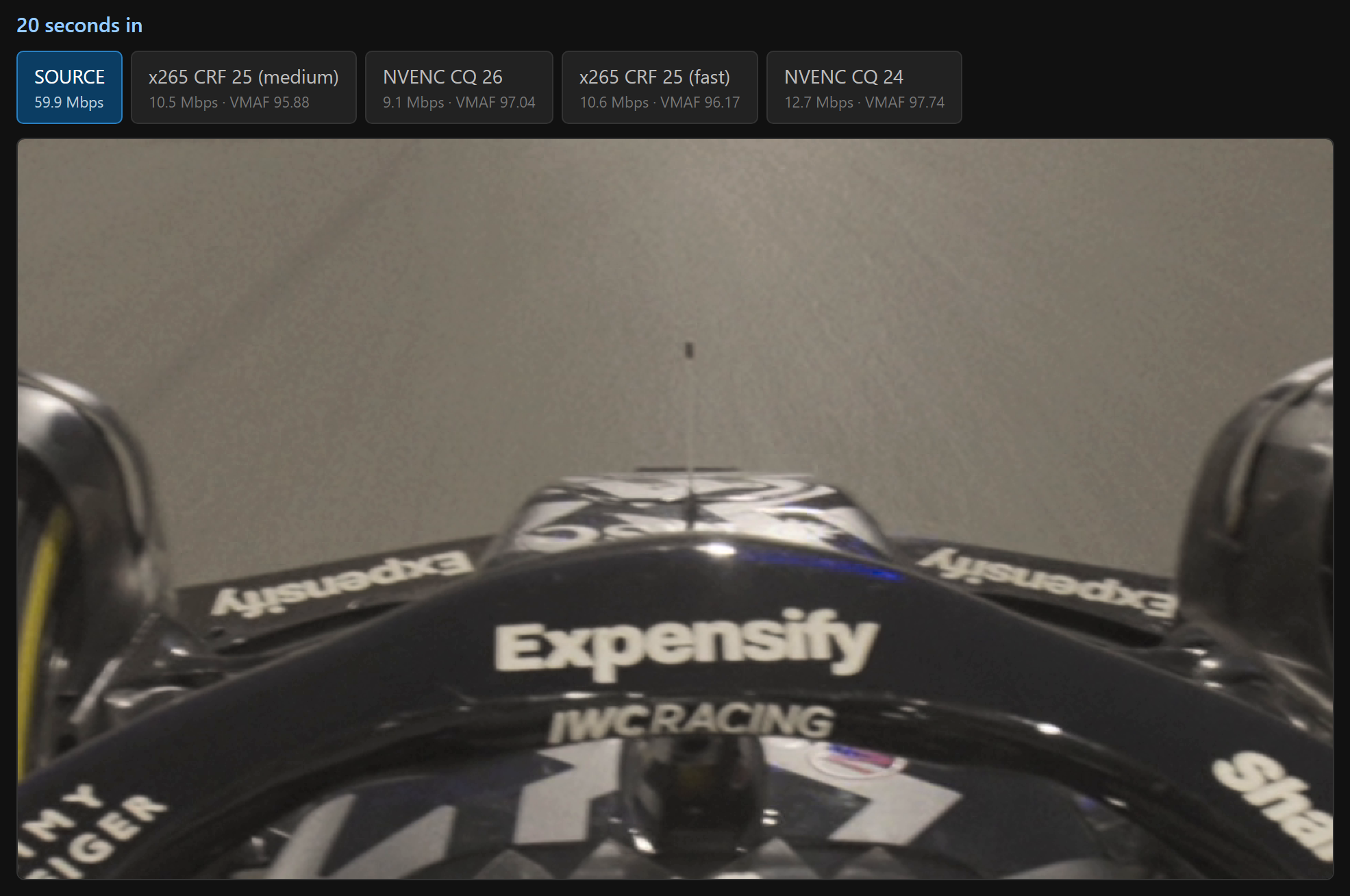
Looking at the actual frames, side by side at full size, the CPU encodes were plainly better to my eye: grain intact, texture intact, faces that still had skin instead of a smoothed out waxy look. The hardware encodes had quietly sanded off the fine detail. This is super evident when looking at a boutique title from someone like Arrow who doesn't process out the grain. On a modern digital film the problem is still there but more subtle. I noticed it most in F1, with asphalt track detail and skin pores in close-up shots.
The tool I built to settle it: the same moment from each encode, full resolution, one keypress apart, with the score printed on every button. Which is how you notice the numbers and your eyes disagreeing.
Where the AI assistance became invaluable, it wasn't in making a decision based on a math formula, industry standard or no. It was in quickly creating a comparison tool for me I could use with my own eyes to make the choice.
It would be easy to just say the metric is broken but after testing, researching and much pondering: the metric isn't broken. It's Netflix's definition of quality, and Netflix has different problems and goals than I do. They're sending millions of streams down variable connections where bandwidth is the enemy. A metric that rewards a clean, smooth, efficiently-compressed picture is exactly right for them. Grain is expensive to transmit and reads to the algorithm as noise.
I'm not streaming anything to anyone. I have a disc I already paid for, a server with room on it, and an opinion that grain is something to be preserved as an authentic part of the film. Not something to clean up to chase smaller file size or a more modern look for older films. No surprise my goals don't match up with Netflix, and I shouldn't be surprised that a tool built for their priorities gives the wrong answer to mine.
So I stopped optimizing for the score and started optimizing for what I could see. Everything now goes through the CPU encoder with grain retention switched on deliberately, a real setting that costs real disk space, telling the encoder to spend bits on texture a size-optimizer would happily throw away. The quality level got chosen by comparing frames from the hardest films I own rather than the easiest: a grainy 1980 catalogue title, a famously grainy 2007 blockbuster. If it holds up there, it holds up on a clean modern shoot.
None of which is a recommendation. It's a setting that suits a collection heavy on catalogue titles and boutique restorations, watched by someone who notices grain and misses it when it's gone. Somebody who finds grain distracting would look at the identical frames, pick the other encode, and be justified in doing so.
What I'd suggest isn't my number — it's doing the exercise, with your own discs, instead of inheriting a default.
On the idea that this is the lazy option
I want to take a detour here, because it's the criticism I hear most and I think it's built on a misunderstanding of what actually happens when someone like me applies AI to a problem.
The assumption is that using AI means the machine does the work and you learn nothing, that it's a shortcut past the part where you'd have gained some understanding. That has not been my experience across any of these projects, and this one is the clearest example yet.
Here's the honest division of labour. I brought the system design. I know how to think about a pipeline: what the stages are, what order they go in, where the checks belong, what should be automatic and what should stop and ask, what "done" looks like. I've built enough things to have opinions about all of that, and every one of those decisions here is mine and the actual process I built myself over years.
What I didn't bring is the coding fluency. I don't know all the python syntax. I didn't understand half the encoding options when I started. I genuinely could not have told you what every slider did in handbrake beyond generalities learned through trial and error and a bit of light documentation reading.
That gap is not the idea. It's the tax you pay before you're allowed to try the idea. Months of practice, learning syntax and flags and API quirks, before you can even begin building the thing you already know you want. That tax is why most of my good ideas never got built. It isn't a lack of vision or effort — it's that the runway was longer than the project deserved.
That's what got removed. Not the thinking, the runway.
And because I was still making every decision, I ended up understanding the subject far better than when I started. I can now tell you that HandBrake's quality setting is a quality target and not a size target: you say how good, the file lands where it lands, which is why one setting yields a 9 GB film and a 25 GB one. I can tell you grain is what drives that gap, and by how much, because I measured it: about a sixteen-fold swing in how much a film compresses depending on how grainy it is. That's why "pick a preset that seems fine" was never going to work, and why some of my initial encode attempts were bigger than the disc they came from.
I can tell you graphics-card encoding isn't simply "worse" — it fails in a specific way, smearing fine detail, and it does that to clean modern footage as readily as to grain, which is what killed the idea of routing some films to it and not others. I can tell you there's no dependable conversion between the CPU's quality scale and a graphics card's, because I went looking for one and watched the equivalent point shift by three and a half steps across three films.
None of that was handed to me as an answer. It came from being able to run a real experiment in an evening instead of a month: cut the clips, run the encodes, build the comparison viewer, put the numbers next to the frames, and look. The conclusions are mine and I can defend them.
Lazy would be taking the default and not asking. This was the opposite of that, and it's only possible because the boring barrier between a question and a test got a lot shorter.
With that settled, the rest of the system is just plumbing. The disc gets scanned and identified. It asks which cut I want when there's genuinely more than one, and which boutique label it is (the only moment anyone knows is while the case is in my hand). Then it rips, queues, encodes overnight, verifies the result against the source, and waits for me to look at it before anything goes near the library.
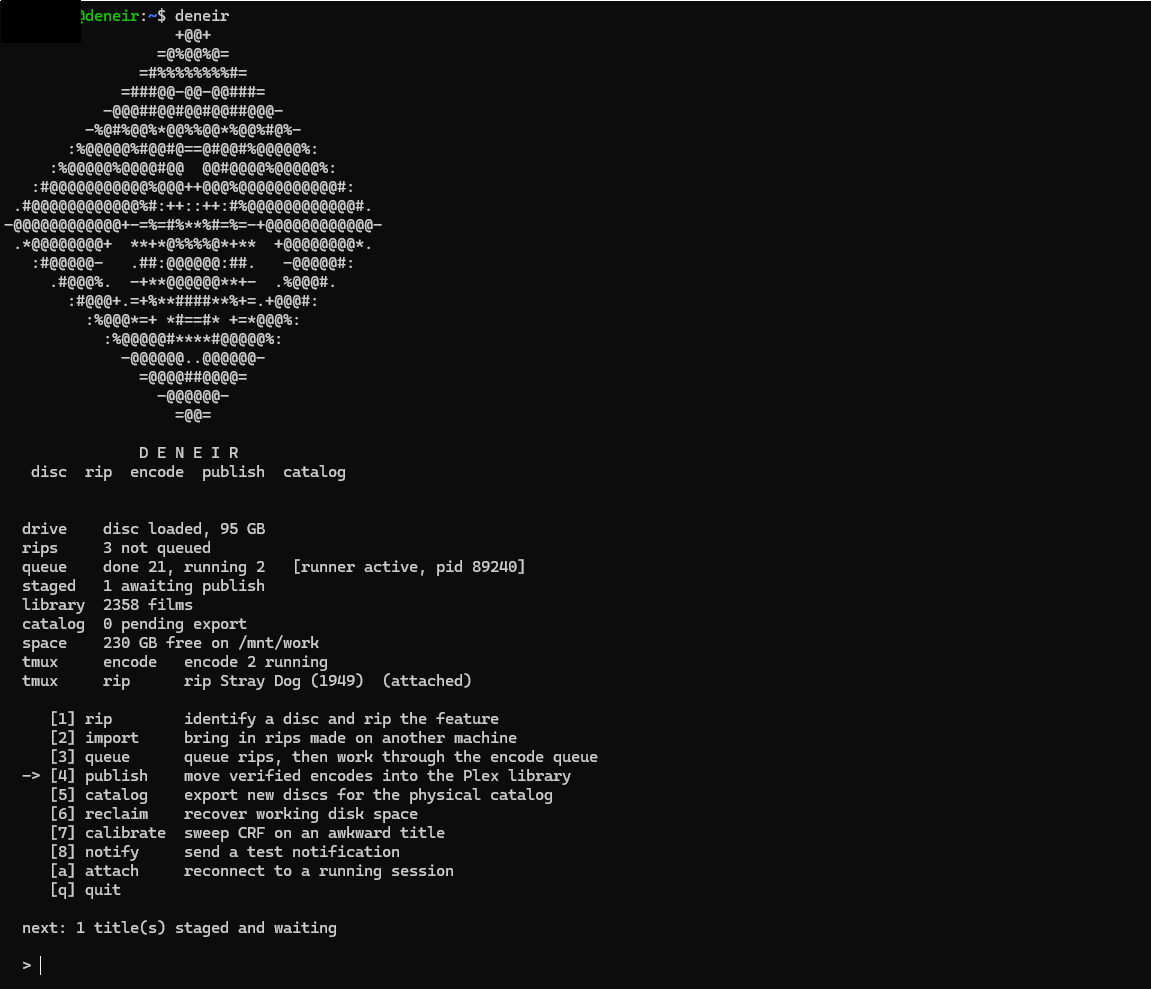
Everything it knows, in ten lines, with an arrow at the one thing that needs me. Here it's ripping a Kurosawa film while encoding two other films, and all it actually wants is for me to look at the one that's finished.
There's a browser version too, mostly so I can check on it without opening a terminal. Speaking of terminal, yes I added old school ASCII art. Yes I'm calling the whole thing Deneir after a D&D deity of literature, literacy, glyphs, images, art, cartography, and scribes. (Seemed fitting, and I needed to call it something while I worked on it.)
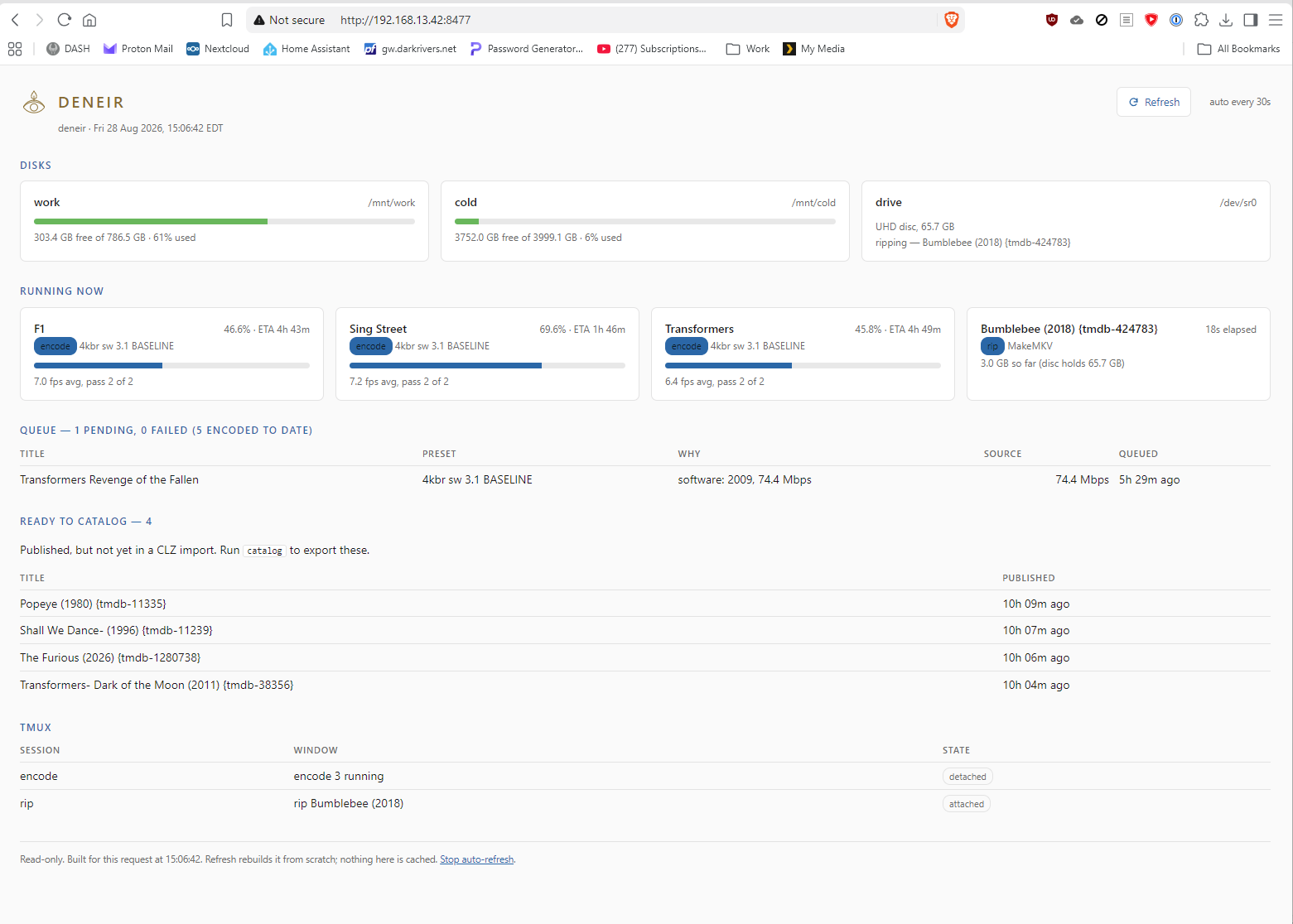
Three encodes and a rip running at once, plus four films published but not yet added to the physical catalog, the job I'd never remember on my own.
Where it's landed
The hands-on time went from ten or fifteen minutes a disc to a few minutes of answering questions. That sounds small until you multiply it out. My library is north of 2,000 titles and it grows every month. At ten minutes each, every hundred discs is the better part of a working day spent clicking through the same four applications. Everything else now happens whether I'm in the room or not, which is the entire point: encoding is slow, six to eight hours a film, three at a time, and it needs nobody present.
The friction is the part that actually mattered though. A disc used to sit in a stack waiting for me to have a free evening and the patience for fifteen careful steps. Now it goes in the drive the day I unwrap it. That queue that used to sit there quietly making me feel bad about my own hobby isn't a thing anymore.
Running three at a time is another great example where the AI crunching the math helped me speed up the process. Turns out a single encode going all out could never max out the CPU cores I was throwing at this problem. Instead running multiple encodes at once uses the cores more fully and while it slows down how fast I process a single title I save time in the long run.
The results are consistent now, which matters more than fast. Every film gets the same treatment, the subtitle and audio tracks get picked the same way every time, the naming is identical, and the edition gets recorded at the one moment anybody knows it. No more "whatever I decided was good last time".
Against the workflow I'd used for years, the files come out 35% smaller and, to my eye, better. Not a trade — both. I'd been paying for size that wasn't buying me picture.
It's very much still in progress. It's all tracked in a repo, which means when I change my mind (and I will) it's a settings change and a re-run, not starting over. Adding or refining a feature is an idea and code session away. The collection will grow, my preferences will drift, better encoders will arrive. The system can move with all of that because it's written down rather than remembered, and because it wraps the tools without replacing them. When something better than HandBrake comes along, that's a component I swap out, not a system I rebuild.
The bit I actually care about: I'm spending my time on curating and watching films instead of ticking boxes in four different applications.
What this is really an example of
I don't think the interesting story here is the encoder settings. It's that a hobby I love had a tedious, error-prone process attached to it, and working with AI turned that into a system in about a week of evenings.
And I want to be clear, because this matters. AI didn't build a system for me. It helped me build mine.
That's not modesty, it's the actual difference. Every decision this thing makes is one I made: which encoder, how much quality, that grain is worth paying for, that the boutique label gets captured while the case is in my hand, that nothing overwrites a film in my library until I've looked at it. None of those came out of a model. They came out of me looking at frames and deciding what I wanted. What the AI did was collapse the distance between having that opinion and having a system that acts on it every single time. That's also why the same process pointed at your collection ought to land somewhere else entirely. A system that matched everyone would match nobody in particular, which is roughly the complaint we all have about the streaming versions of our films.
It got plenty wrong along the way, and that matters to say too. It told me a disc was in an empty drive. It once tried to file a Kurosawa film as a 22-minute making-of documentary because it thought the runtime matched more precisely. Every one of those was a confident wrong answer rather than an error, which is exactly why the checks exist and why I drive the design and decision making.
Same conclusion I came to with the bookshelves, and I keep arriving at it. AI is an assistant, not a replacement: very good at the parts I don't want to do, and completely uninterested in whether the answer is right. That part is still mine, and I ended up knowing more about my own hobby for having done it this way rather than less.
It just isn't the thing deciding what a film should look like. I am.